As motion systems miniaturize, precision motion solutions and ease of integration are more essential than ever. This makes choosing the right software to command your hardware a vital step for performance, efficiency, and user experience.
With leading miniature motion modules in applications like extended reality, medical devices, analytical instruments, aerospace, metrology, and robotics, New Scale Technologies has designed a software just for that purpose: New Scale Pathway Software — a powerful, intuitive control platform for our family of smart motion modules.
Keep reading to discover its standout features and the benefits it brings to engineers, researchers, and product developers. Ready to install? Watch the demo to get started.
What Is New Scale Pathway Software?
New Scale Pathway Software is a PC/Windows‑based control interface that allows users to operate, configure, and rapidly evaluate our M3 Motion Modules, SQUIGGLE motor controllers, and custom integrated motion systems. It supports a variety of miniature stages — including linear, rotary, and focus stages — as well as multi‑probe micromanipulator systems and the brand new DART™ Smart Linear Actuator.
The platform serves as both an operator tool and a development environment for scripting, automation, diagnostics, and sensor integration. It’s easy-to-use “point and click” graphical interface interactively operates with our modules and motors with just a mouse, keyboard, and a few system requirements:
- Windows 7 or later
- Microsoft .NET framework version 3.5 (included in the Pathway software package)
- 600 MB free disk space (1600 MB if Microsoft .NET 2.5 is not installed)
- Computer administrator privileges
Ready to use the software to evaluate your motion modules? Access the software online today.
Key Features
Pathway creates a sense of clarity and trust with advanced evaluation features, making it easy for both new and experienced users to work confidently with precision motion.
Fast, Guided Installation
Pathway is installed in about five minutes and automatically detects compatible stages. Running the installer as an administrator ensures proper functionality, giving users a smooth start. The installation process includes device selection on startup, auto-populated manuals for each M3 module, and a quick USB port detection and connection testing.
Quick installations allow users to move from unboxing to motion in minutes, not hours, making this critical for lab productivity and rapid prototyping.
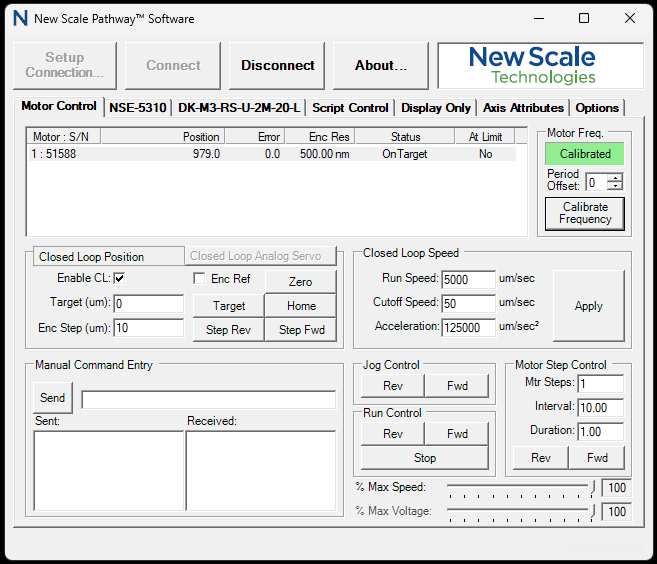
Intuitive Motion Control Interface
The control panel is the heart of Pathway. It displays real‑time feedback and offers an accessible command center for every device. New users can easily dive into their first evaluation without professional training, with access to advanced and intuitive features like:
- Live position monitoring, constantly updating as the stage moves.
- One‑click calibration to establish a precise, known reference point.
- Targeted moves using typed‑in position values.
- Manual jogging for exploratory or incremental motion.
- A consolidated view that works uniformly for all linear and rotary stages, simplifying the learning curve across hardware types.
Dual Mode Control: Closed Loop & Open Loop
Pathway supports both precision‑driven closed‑loop motion and high‑speed open‑loop operation depending on application needs.
Closed loop mode uses internal sensors to track actual position, enabling highly accurate movements and repeatability suitable for applications like optical focusing, micro alignment, and precision automation. Open loop mode, by contrast, prioritizes speed over feedback, driving the motor based on steps and timing rather than positional tracking, ideal for fast coarse positioning, scanning routines, or tasks where reaching a general region matters more than exact placement.
The ability to toggle quickly between the two modes gives engineers flexibility to tailor performance based on speed, precision, and the needs of their workflow.
Script Controls
Script Control transforms Pathway from a simple driver interface into a genuine automation platform.
This built in automation environment allows users to create repeatable multi step routines, logic driven workflows, and motion sequences without writing external software. Users can design loops, introduce conditional logic, define variables, adjust speeds, create structured timing behaviors, and even inject direct ASCII commands for low level control.
It also offers preloaded demo scripts as a starting point for building custom routines, while the visual scripting environment makes it approachable even for those without programming backgrounds. Engineers frequently use Script Control to develop motion behaviors such as scanning patterns, alignment routines, optical steering sequences, and automated testing procedures.
Motion Performance Logging
- This feature is Pathway’s built in engineering workstation. The Performance Log visualizes exactly how a stage behaves during any move by capturing:
Actual vs. target position, shown as separate graph traces - Motor power and gain usage, indicating workload and drive efficiency
- Settling behavior and overshooting
- Repeatability of back‑to‑back moves
Engineers can isolate individual steps, examine how performance changes under different loads or tuning conditions, and export logs as CSV files for deeper analysis in spreadsheets or other tools. This level of transparency is invaluable for diagnosing performance issues, validating device behavior, and ensuring system accuracy over time.
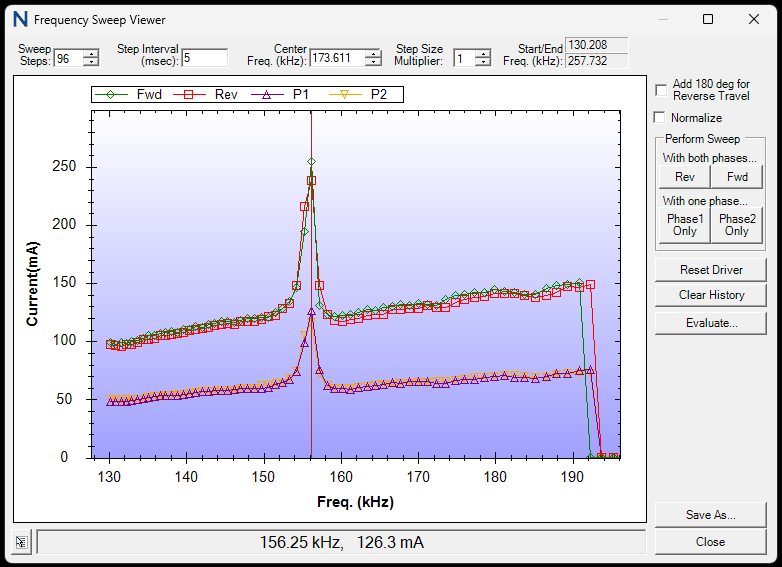
Frequency Sweep Tool
The frequency sweep viewer is a sophisticated diagnostic utility normally found only in high end industrial motion platforms.
This feature drives the motor through a range of electrical frequencies and displays current draw patterns, producing a visual “health signature” of the motor. Engineers can perform sweeps in single phase or dual phase modes to analyze how the motor behaves under different conditions.
The resulting curves help identify mechanical friction, electrical irregularities, wear, or mounting issues long before they affect accuracy.
Direct ASCII Command Input
For integrators and developers, Pathway provides a direct portal for issuing low level ASCII commands directly into the model. This gives users access to the same command level communication that their embedded or host software will eventually use, allowing them to prototype motion instructions in real time.
Instead of relying solely on documentation, developers can test and verify their command sequences directly within Pathway, dramatically smoothing the transition from prototyping to integration and reduces the risk of unexpected behavior during code development.
What does this mean for my motion system?
Collectively, these features translate into substantial benefits for users. Pathway enables rapid setup and quick learning, reducing delays in research, prototyping, and production environments.
Key Benefits:
- Quick Setup: New users can go from installation to making precise moves in as little as five minutes. For busy labs, automation teams, or R&D environments, this means less downtime and more progress.
- Precision & Speed Without Compromise: The combination of closed‑loop and open‑loop control provides unmatched flexibility for tight tolerances and fast throughput.
- Transparent and Traceable Testing: Live motion logs and frequency sweeps give engineers deep insight normally found only in large‑scale industrial systems.
- Practical and Integration-Ready: Its interface is forgiving, intuitive, and built for real‑world workflows. What you prototype in Pathway can translate directly into your custom software workflow with the same ASCII command structure.
- Optimized User Experience: Because Pathway is intuitive and self‑diagnosing, users rarely need technical assistance for setup, motion, or tuning. Organizations save time, reduce service calls, and maintain forward momentum.
- Scalable Across All M3‑Series Stages: The software works with linear, rotary, or focus modules, providing a consistent user experience and control workflow
In an industry where precision, reliability, and speed can make or break your project, New Scale Pathway Software stands out as a motion control ecosystem that empowers users to develop, test, automate, and integrate micro-motion systems with confidence. It brings clarity to complex motion, removes friction from early stage development, and gives access to controls and insights normally reserved for much larger platforms.
With intuitive operation with deep diagnostic power and flexible automation, Pathway opens a new road to faster prototyping, smarter integration, and more reliable precision.
Want a closer look at how this software can enhance performance and accelerate deployment in your projects? Contact New Scale Technologies for more insights.